
After logging in to ReturnBear, you can manage both incoming and existing returns from the All Returns page, your starting point for handling returns. This page provides an overview of all your returns including information such as return case ID, order number, customer details, and status.
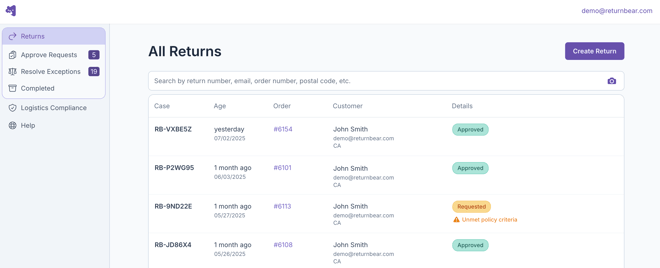
On the sidebar, there are the following options:
Returns
From the Returns section, you can:
- View all of your returns to date under All Returns
- Approve or deny pending return requests under Approve Requests
- Handle return cases that have failed verification under Resolve Exceptions
- Issue payouts for returns pending reimbursement under Payout
Note: This section is only visible to merchants who are configured to issue payouts manually
- View all completed returns under Completed
From any page within the Returns section, you can create a return on behalf of a customer by clicking on the purple Create Return button.
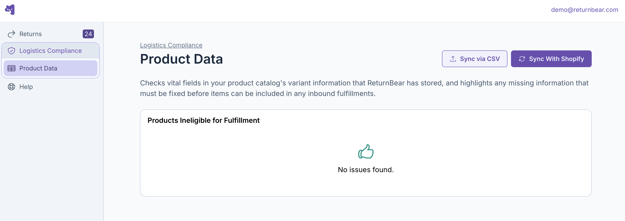
Logistics Compliance
From the Logistics Compliance section, you can access the Product Data tool to review any product variants from your product catalog that may be missing the information required for cross-border returns such as Harmonized System (HS) code or country of origin.
Help
Click Help to be taken to our Help Center where you can review documentation and resources around how to use ReturnBear. You may also submit a request to our team.