
This article covers how to waive fees for specific customers at the time of return creation using Shopify tags. For information on how to waive fees and incentives in the ReturnBear Admin after return creation and approval, click here.
Overview
Shopify tags can be used to waive return fees for specific customers or customer segments at the time of return creation.
Prerequisite
In order for return fees to be waived for specific customers at the time of return creation, the following must first be implemented.
Customer tags or segments
- All customers you wish to waive return fees for at the time of return creation must have at least 1 tag configured in Shopify
- For more information on how to add and edit customer tags, see Shopify's Help Center instructions here
- To apply a singular tag to multiple customer's at once, use Shopify's Bulk editor
- To keep things organized on your end, it is recommended that you create a customer segment in Shopify for all customers that share the same tag AND should have return fees waived at the time of return creation
- For more information on customer segments, see Shopify's Help Center article here
Setup and configuration
Apply a singular tag to all customers you wish to waive return fees for in Shopify. ReturnBear will waive the return fee is this tag is present at the time of return creation. If the tag is no longer present for the same customer on the next time of return creation, no fees will be waived.
Tell us the tag that will be used to waive return fees
Please contact ReturnBear and provide us with the tag you will be using to waive return fees at the time of return creation. ReturnBear will handle all configuration of the return fee waiving on our end using the provided tag.
NOTE: At this time, ReturnBear can only support waiving one fee.
What it looks like
Once implemented, you will be able to see the relevant fee waived in both the Return Merchandise Authorization (RMA) Portal and ReturnBear Admin.
Return Merchandise Authorization (RMA) Portal
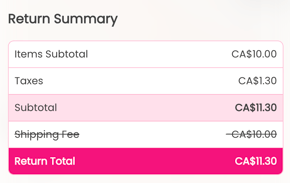
In the RMA portal, waived fees will be listed under the Return Summary with the original feel amount crossed out. The original fee amount will be excluded from the return total.
ReturnBear Admin
In the ReturnBear Admin on a return case's detail page, waived fees will be listed under the Return Summary > Consumer Fees & Incentives with the original fee amount crossed out. The original fee amount will be excluded from the return total.
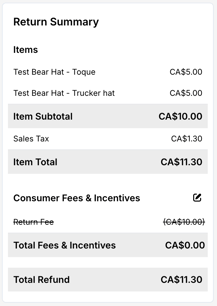
If needed, you may also edit fees and incentives from the Return Summary after return creation. For more information, see Editing or waiving fees and incentives.