
The Assistant is the home base in the ReturnBear Admin. It's the first thing you'll see when you log in, designed to give you a clear, prioritized list of actions needed to keep your returns process running smoothly.
The goal of the Assistant is to provide a single, at-a-glance view of tasks that require your attention. By completing these tasks, you ensure your customers receive timely resolutions and your inventory is processed and restocked as quickly as possible.
By regularly checking your Assistant dashboard, you can stay on top of all critical tasks and ensure your entire returns lifecycle is efficient and effective.
The Assistant is divided into two main sections: Return Cases and Fulfillments & Inventory.
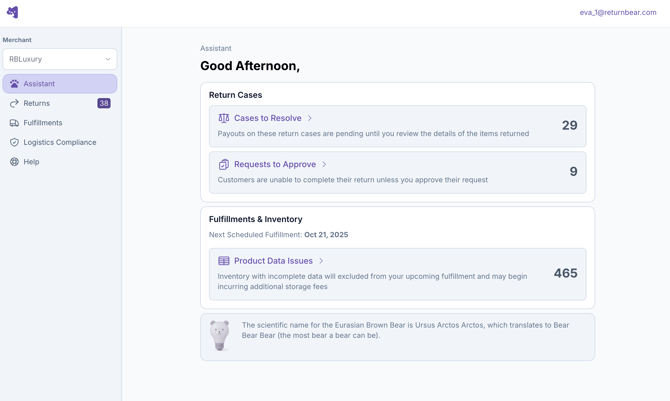
Return Cases: Your Customer-Facing Priorities
This section is listed first because these tasks directly impact your customers and prevent return cases from being completed. Addressing these items promptly leads to higher customer satisfaction.
Here are the different types of tasks you might see:
Cases to Payout
This shows the total number of return cases that have been received and verified at our warehouse but have not yet been paid out (refunded, store credit issued, etc.) to the customer. Note: this task will only appear for merchants that have opted out of automatic payouts via ReturnBear verifications
Action Required: Click on this task to be taken to a list of returns that are ready for you to issue a payout to the customer. For detailed instructions, see our guide on Processing Returns Pending Payouts.
Cases to Resolve
This shows the total number of return cases that the have been flagged with an issue or unexpected item and our team requires your direction to proceed. This may include items that were returned damaged, were different from what the customer declared, or if unexpected items were included in the return package.
Action Required: Payouts for these returns are paused until you review the details and provide instructions on how to handle the exception.
Learn More:
Requests to Approve
This shows the total number of return requests submitted by customers that could not be auto-approved based on your return policy rules.
Action Required: These requests must be reviewed and approved or denied. Approving a request allows the customer to receive their return QR code or shipping label. Denying it will notify the customer that their request was not approved. For detailed instructions, see our guide on Approving Return Requests.
Fulfillments & Inventory: Keeping Your Stock Moving
This section gives you insight into your consolidated inventory at ReturnBear warehouses and its journey back to you. You'll see the date of your next scheduled outbound fulfillment from ReturnBear. This section will also provide you with information on inventory that's unable to be fulfilled back to you due to missing data requirements.
Product Data Issues
If some of your returned inventory cannot be included in your next fulfillment due to incomplete or missing product data (like SKU, HS Code, Country of Origin, or other required information). This information is important for preparing inventory for restock (ie. printing new barcodes) and/or cross border compliance for customs clearance. Providing the information in a timely manner is necessary to avoid any additional storage fees for inventory that is sitting within the ReturnBear warehouses and getting your items back to be restocked and resold.
Action Required: Click on this task to view all products with data issues and update the necessary information. The number on the right indicates the total number of products affected, but the total number of inventory items may be greater.